How county professional societies run officer elections online
County bar, dental, medical and CPA societies can run officer elections online when their bylaws and governing law permit it. The executive director or election committee confirms eligibility, nominations, notice and the voting window. After the ballot closes, officers apply the required threshold, certify the count and record the result for the installation meeting.
Keep the officer election and installation on one calendar
A county bar, dental, medical or CPA society often puts the officer election next to its annual meeting and installation. The executive director or election committee still has to settle who may stand, who may vote, how notice reaches them and who certifies the result. Moving the ballot online changes how members vote; it does not settle those rules.
Write the process down while the slate is still being assembled. An uncontested year is a good time to check the procedure, rather than waiting until two colleagues want the same office.
Read the authority before setting the dates
Check applicable law, the society's certificate or articles, its bylaws and any adopted meeting rules. The Robert's Rules authors explain that their answers are defaults subject to applicable law, bylaws and special rules. A bylaw does not override a controlling statute.
Extract the offices and terms, nomination routes, eligible member classes, dues-standing rule, notice period, quorum, winning threshold and required ballot method. Check separately whether a vote may happen outside the annual meeting. A rule permitting a secret ballot does not by itself authorize every electronic procedure.
If the bylaws require mailed ballots or a vote at a meeting, ask the society's counsel whether a change is needed before replacing that method. A board resolution is not a general substitute for the authority your society lacks. New York N-PCL 613, for example, addresses member votes for corporations within its scope; it is not a rule for every society or an authorization of every online vote.
This guide is general information, not legal advice. Your society's legal form, jurisdiction and governing documents determine the procedure.
Assign each stage before the nomination call
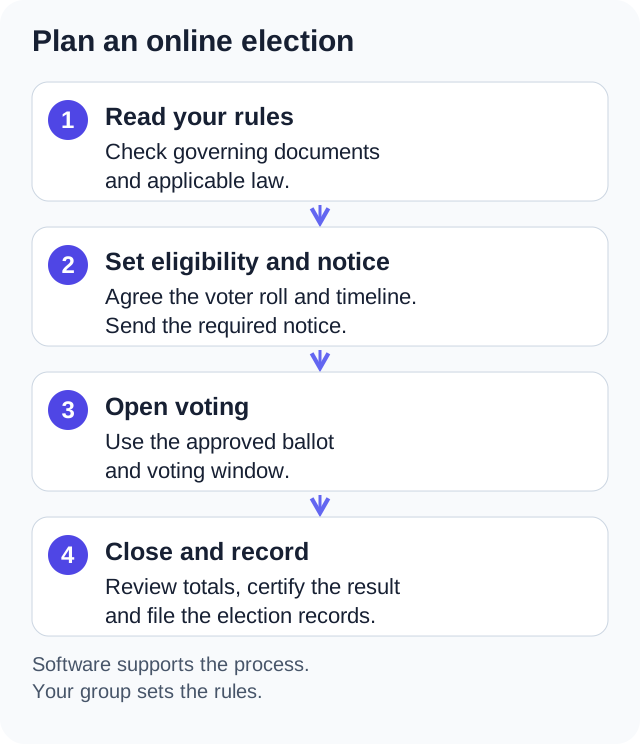
The sequence below combines the election calendar with the work the portal can support. Put your actual required dates beside it. The example windows are planning prompts, not statutory deadlines.
| Stage | Society's task | Where the portal can help |
|---|---|---|
| Nominations | Appoint the committee and publish every permitted nomination route | Keep committee papers and discussion together |
| Slate | Check consent to serve and publish the candidates under the rules | Put candidate statements where members will read the election material |
| Notice | Use the required dates and delivery methods; retain proof | Send a separate announcement and keep the posted notice with the packet; this does not replace a required mailing |
| Voting window | Set eligibility, access help, any permitted paper path and the closing procedure | Provide a ballot members can reach from a phone or computer |
| Certification | Apply the required threshold and record who certified the result | An administrator closes and tallies the online election; officers remain responsible for certification |
| Installation | Seat the officers under the society's rules | Keep the certified result with the annual meeting record |
Working backward might mean seating the committee 10 to 12 weeks before the annual meeting, publishing the slate 6 to 8 weeks before it and allowing a week for voting. Use a longer or earlier schedule whenever your actual notice or nomination requirements demand it. A member in court, seeing patients or working through tax season needs a real opportunity to read the material and vote.
Decide the uncontested and contested paths in advance
If your rules permit voice vote or acclamation for an unopposed slate, follow that procedure and record it. First make sure members had the nomination opportunity your rules require. Do not assume that an uncontested slate removes a ballot requirement written into the bylaws.
For a contested race, settle the required ballot method before asking members to use a tool. A form that shows named answers to staff is a different process from a ballot kept out of the society's administration screens.
In One Group Central, the service encrypts a ballot before storing it and refuses a second submission from the same eligible member account. After an administrator closes and tallies the election, officers and eligible members see aggregate results. Small totals can still reveal a choice, such as when everyone votes for the same candidate.
The service receives each member's identity and choices before encryption, and we hold the keys. This is not secrecy from the service operator. A voter's device-held receipt checks an entry hash and position against the server's election record while the voter remains signed in on that device. It does not independently prove the choices were encrypted or counted correctly. After a successful tally, the live decryption key is deleted, so the society cannot reopen the ballots for a recount. Read the election privacy limits and receipt limits before choosing the system for a binding election.
Reconcile the roll before opening, then watch for changes
Decide whether active, affiliate and retired members vote, how lapsed dues affect eligibility and what date controls. Reconcile the roster against resignations and current dues records. Publish the eligibility rule with the notice so a member can raise a disputed entry before the ballot opens.
One Group Central builds its initial voter list when the election is created. A new member who accepts an invitation before the election closes can be added when they meet its audience rules. If your society fixes eligibility at a particular date, plan how to hold invitations or check late joiners against that rule. Keep your own dated roll snapshot; the app does not calculate your meeting quorum or provide a named list of who voted.
If members need a paper route, design it before opening online voting. One Group Central has no integrated paper-ballot count, proxy management or cross-channel duplicate control. Merely adding paper and online totals does not establish that every eligible member voted once. Your election officials need a permitted process for eligibility, channel assignment, custody, reconciliation and certification that preserves the required secrecy.
Close the ballot, certify and keep the packet
Publish the closing procedure and assign the person who will carry it out. The app's New Election dialog does not set a closing time. An optional closing time set through the API rejects new ballots but does not count them; an administrator still tallies it: Close & Tally while it is open, or Tally Results after Close Voting. When configuring the ballot, you can choose "Send announcement to members" and prepare the opening message; it is held until voting opens under the start option you chose. Plan any later reminders separately. Do not send a second manual opening notice merely because the announcement was prepared before opening. Do not promise members a live turnout list that the application does not provide.
Use Close Voting when you need to stop new ballots without counting them. The uncounted ballots remain for a later tally. Close & Tally stops voting, counts the ballots, publishes results and deletes the live private key; those tallied ballots cannot be decrypted again for a recount. An owner can reopen a tallied election to accept additional ballots, but that does not recount the ballots already tallied.
After closing, have the authorized officials review the totals against the society's winning threshold and certify under its rules. Keep these records together:
- The nomination call, slate and candidate statements as published.
- The notice, delivery evidence and the adopted procedure.
- The eligibility rule and dated roll snapshot, noting qualifying late joiners.
- Any separately administered paper or proxy records and reconciliation, where permitted.
- The recorded tally, certification and annual meeting minutes.
The packet supports a later review; it does not guarantee a challenge will fail. The same private portal can hold the society's documents, announcements, committee discussions and calendar between elections. Officers still decide which records must be preserved and who may inspect them.
Try the portal with a small practice group
Try documents, announcements, directory and events together, then test the ballot and receipt workflow with a practice group. Check your actual rules and the limits above before choosing a binding officer-election process. The 60 day trial includes up to 25 people and needs no credit card.
Start your free trial