We are here to help
You reach the people who build the product, and there is no ticket queue. Whether you are an admin setting up your organization or a member trying to sign in, this page has the fastest path to one of us.
The fastest way to reach us
Pick whichever channel suits you. All three reach the same small team.
Best for most questions
Setup help, billing, bug reports, feature requests.
info@onegroupcentral.comBest for urgent issues
Locked out, election about to open, payment failed.
631-327-0064Best for general inquiries
Pricing questions, demos, partnerships.
Contact formWhat we can help with
| You are a... | We help with |
|---|---|
| Member | Sign-in problems, lost invite emails, account questions, how to vote, how to update your profile. For permission or role changes, contact your organization's admin first. |
| Admin | Setup walkthrough, inviting members, branding, configuring features, running elections and polls, billing changes, exporting data. |
| Prospective customer | Demos, pricing questions, security and compliance review, custom branding, contracts, onboarding timelines. |
| Developer or auditor | API questions, how receipts are checked against the election record, integration help. Email us for the scripts that download an election record, and a plain account of what they can and cannot show. |
Common questions
I did not receive my invite email.
First, check your spam or junk folder, and search for your organization's name, which appears as the sender. If it is not there, ask your organization's admin to resend the invite from the admin panel. If you still cannot find it, email us with your name and organization and we will track it down.
I forgot my password.
On the sign-in screen, tap "Forgot password" and enter the email address you joined with. You will get a reset link within a minute. The link is valid for one hour. If it does not arrive, check spam, then email us.
I cannot see a feature I think should be there.
Most features are toggled on or off by your organization's admin under Settings. Elections, the member directory, groups, and several others can each be switched off per organization. If you are an admin and cannot find a setting, email us with a screenshot and we will point you to it.
How do I cancel?
Email info@onegroupcentral.com and we will walk through the three options (pause, cancel with 90-day retention, or cancel and delete now). Full details on the cancellation page.
How do I export my data?
Admins can export the audit log as CSV from the admin panel. For a full export of every document, member record, election, and poll, email us and we will deliver a single ZIP within 7 days. Exports are always free.
Can I verify a past election result?
Not the count itself. Totals are calculated on our servers when an admin closes the election, and members cannot recount them. What you can check is your own ballot. Each ballot is kept, encrypted, in an append-only election record, and your receipt is saved in the app on the device you voted from. It stays there only until you are signed out on that device or the app's data is cleared, and it never appears on another device or browser.
While the receipt is saved on that device, open the election, tap Verify to open your receipt, then tap Verify my vote to check that the record still holds your ballot at the position on your receipt. For a copy that lasts, tap Copy receipt on the receipt screen right after you vote. Email us for the scripts that download an election record and the walkthrough that explains what they show and what they do not.
Is my data shared with anyone?
Only with the service providers that run One Group Central. We do not sell your data, and we do not share or analyze it for advertising. Those providers handle hosting and storage, email delivery, text messages when your organization turns them on (Twilio), push notifications (Google Firebase and Apple), payment processing (Stripe), crash and performance reports (Sentry), and usage analytics (Umami and HeyCatch, plus Ahrefs on this public website). Each provider gets only the data it needs to do its job. Full details are on the privacy page.
Response times
| Type of request | Typical response |
|---|---|
| Urgent (sign-in down, election opening, billing failure) | Within 2 business hours |
| Setup and configuration help | Within 1 business day |
| Feature requests and general questions | Within 2 business days |
| Security disclosures (see below) | Within 24 hours, every day of the week |
Reporting a security issue
If you believe you have found a security vulnerability, please email info@onegroupcentral.com with the subject line "Security disclosure". We acknowledge every report within 24 hours, including weekends.
Please include:
- A clear description of the issue and the potential impact.
- Steps to reproduce, with any URLs, request bodies, or screenshots.
- Your name or handle (or anonymous, if you prefer).
We do not currently run a paid bug bounty, but we publicly credit anyone who reports a real issue in good faith (unless you ask us not to). Please give us a reasonable window to fix and deploy before any public disclosure.
What to include when you email us
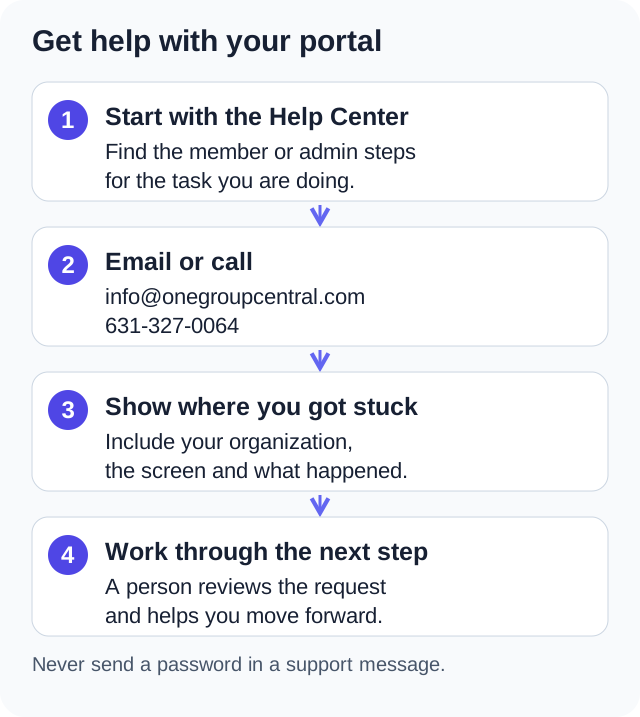
The more of this you can include up front, the faster we can help:
- Your organization name or slug (the part after onegroupcentral.com/ in your portal URL).
- The email address you sign in with.
- What you were trying to do and what happened instead.
- Screenshots, if there is anything visible on screen.
- The device and browser you are using (for example, Safari on an iPhone 15 or Chrome on a MacBook).
If you do not have all of that, send what you have. We will ask if we need more.
Status and outages
If something does not look right and you suspect a wider outage, email or call us. We monitor the service continuously and we will know within minutes of any disruption. We post live status updates in your portal's in-app banner during any incident, and we email all admins when a fix has shipped.
Still stuck?
Email info@onegroupcentral.com or call 631-327-0064. A person reads every email and answers the phone.