Release preview
Put dues and event charges where members can find them
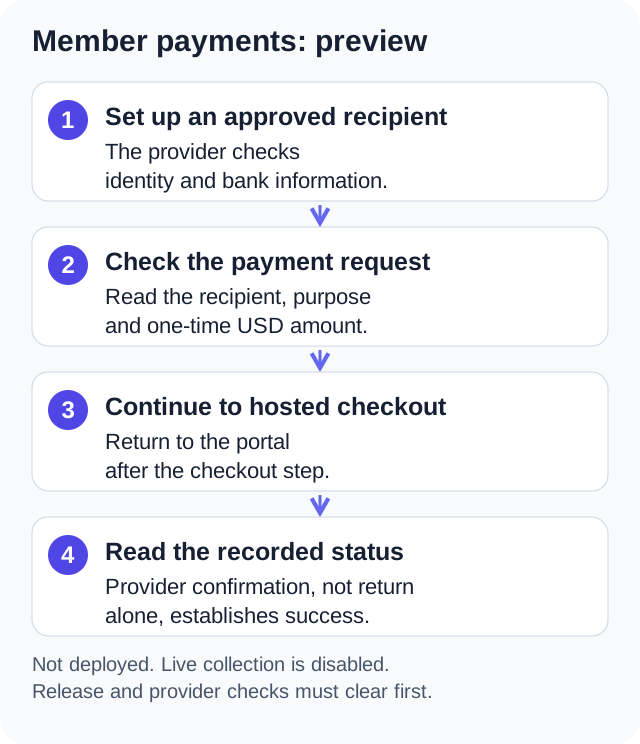
Release preview, in development and not deployed: One Group Central member payments put one-time USD dues and event charges in your member portal. Each charge names who gets the money, members pay on a hosted checkout page, and the result stays on record.
Release preview. Availability follows deployment.
Published: . Last updated: .
Show members what they owe and who gets it
Collecting dues often means a spreadsheet of who paid and who still owes. One Group Central's member payments put each charge in the portal, next to your news and events. The record shows who has paid. It is a release preview. It is in development and not deployed.
Release preview: Payments is in development and is not deployed. Three things must happen before live use. We must finish release checks. The payment provider must approve how money is collected. And each person or group that gets paid must finish setup.
A member assigned a charge sees the amount and who gets the money. They pay on a hosted checkout page and can see the result after. Live collection stays off until the provider approves, setup is done and release checks pass. Keep your current payment service for now.
Charge the right person once
Managers can create a fixed charge for chosen members and add a note, like a unit number. An HOA can pick one person to pay for each unit. That way the same dues do not go to every resident with an account. The unit note is just for your records. The app does not track who owns a property or decide who legally owes an assessment.
Let a trusted organizer collect event fees
An admin can approve a member to collect fees for an event. That member finishes the payment provider's setup for receiving money. Then they create a collection with a description and a fixed amount. A collection can link to a calendar event. Being approved to collect does not make the member an admin.
Stripe's hosted onboarding documentation describes the form a person fills in to get paid. It asks for business and identity details. The provider then checks and approves that person. That is separate from your admin's approval. No one can collect live payments until the provider approves and release checks pass.
Dues go to your organization's own account. Event fees go to the account of the organizer who collects them. Checkout shows who gets the money, so members can check before they pay.
Keep the record after checkout
Coming back from checkout does not prove a payment went through. The app waits for the provider to say so. The record keeps each result: pending, paid, failed, refunded or disputed. If you stop taking new payments, past payments stay on record.
The preview takes one-time card payments in US dollars, paid into US accounts only. Whoever gets paid covers the card fees. One Group Central adds no fee per payment in this version. This first version has no recurring dues, autopay or installments, and no record of who owns each unit. Whoever got paid handles refunds and disputes in their Stripe dashboard.
The limits built into the preview
Each request is for one fixed amount, from $0.50 to $999,999.99. A title can run to 160 characters and the description to 2,000. That leaves room to say what the money covers and any refund terms. One request can list up to 1,000 payers, each person once. A household or unit note can be up to 120 characters. The same note cannot appear twice on one request. So a unit cannot end up with two payers by mistake.
Dues follow stricter rules than event fees. Dues always go to the organization's account and always name who pays. You cannot offer dues to all members as an open collection. A member collector can only collect for an event, never for dues or general fees. They cannot pay their own request. Each payer pays a request once, and a second try on a settled charge is refused.
A due date only records the date you asked for. The app adds no late fees. A checkout page stays open for about half an hour. If it runs out, the member starts a new checkout from the same request. No new charge is made.
Who can do what
Owners can handle payments without a separate permission. An admin needs the Manage Payments permission. It starts off for every admin, even one promoted later. No one gains power over money without you knowing. An approved collector manages only their own event collections. They cannot see what other members paid. A member sees the charges assigned to them and their own payment history.
The Payments switch in Settings is off by default. Creating a request, closing one and starting a checkout are each written to the audit log. So you keep a record of who asked for money and when.
An example of the intended use
A condo board could use the preview to ask each unit for a special assessment. The manager creates one dues request for the fixed amount. They pick one owner per unit to pay and enter the unit number as the note. Owners see the charge in the portal, with the board named as the one getting paid. They pay through hosted checkout. The board's record shows which units have paid and which are still open.
A teachers union local could approve its social committee chair to collect for a retirement dinner. The chair finishes setup with the provider. Then the chair links a collection to the dinner on the calendar and offers it to all members. Ticket money goes to the chair's own account, and the local's dues account is not involved. Both cases show how the preview is meant to work once it is released. Neither one is the record of a real group using it.
FAQ
Can we collect dues through One Group Central today?
No. Member payments is a release preview in development and is not deployed. Keep your current payment service until your organization announces that collection is available.
Does One Group Central store card numbers?
No. Checkout and setup to get paid both happen on the payment provider's hosted pages. The app stores no card or bank details.
PCI Security Standards Council's outsourcing guidance says that using a payment provider does not end a merchant's duty to protect payment data. A hosted checkout alone does not make you PCI DSS compliant. Confirm the recipient's payment security duties with the provider before collection begins.
Can a member pay twice by mistake?
The preview refuses a new checkout for a charge that is already settled. An unfinished checkout is picked up again, not duplicated. Replacing a request is different. Say a manager closes a request and makes a new one. Check the payments first, so no one is asked to pay twice.
Can we set up recurring dues or autopay?
No. The first version handles one-time charges only. Recurring dues, autopay and installments are not part of it.
Guides for each role
The administrator guide covers collection setup. The member guide covers checkout and past payments.
See the release preview
Release preview. Availability follows deployment.