Manage dues and event collections
Can I manage dues and event collections now?#
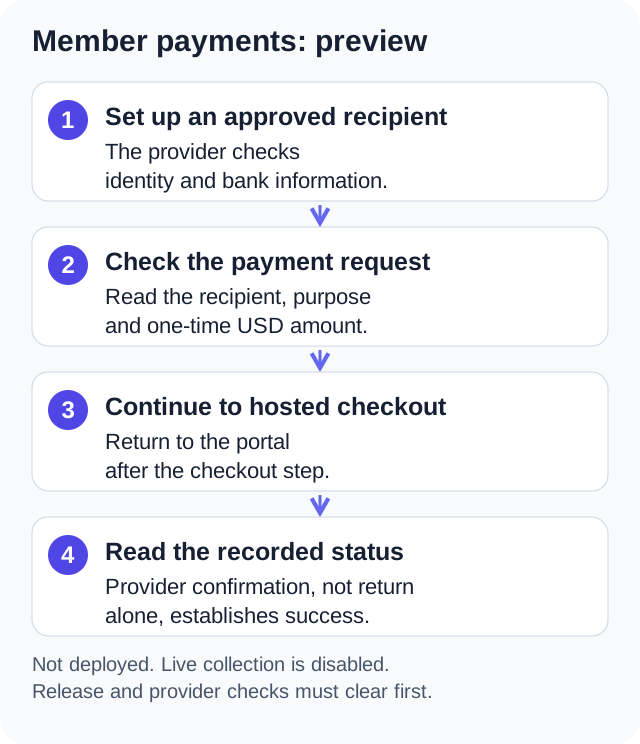
Member payments are a development preview and are not deployed. After release validation and provider setup, owners and admins with Manage Payments can manage organization charges and approve member event collectors. Live collection remains disabled until those requirements clear; use your current dues and event-payment service meanwhile.
Access and responsibilities#
Organization owners and administrators with Manage Payments manage organization charges and approve member collectors. Approved members manage their own event collections. Approved member collectors cannot create organization dues or choose another person's recipient account.
The organization needs its own recipient account for dues and fees. Each approved member collector needs a separate recipient account for their event collections. Approval by an administrator does not replace the provider's identity checks or acceptance of the collection's purpose.
The payments preview accepts one-time USD card payments for US recipient accounts. Recipients pay processing costs and manage refunds and disputes. One Group Central adds no transaction fee in this version. Subscription Billing remains the place to manage the organization's One Group Central plan.
Set up a recipient#
- Open "Collections" in the Admin Panel, or "Payments", then choose "My collections". Find "Payment setup".
- Choose the organization recipient or your own member recipient, as allowed by your permissions.
- Choose "Continue setup" to open the provider's onboarding page.
- Complete the requested identity and bank information with the provider.
- Return and choose "Refresh status".
Returning from onboarding does not mean setup is complete. Collection stays unavailable until the provider reports the required readiness. Test mode setup does not enable a live recipient.
Approve a member collector#
Open "Manage collectors" and approve the active member who will collect event fees. The member then completes their own recipient setup. Revoking approval prevents new collection actions; it does not erase payment records or undo payments already made.
Create dues or a fee#
- Open "My collections" and choose "Create request".
- Enter a title and description that identify what members are paying for.
- Choose the purpose, organization recipient, and fixed USD amount.
- Select the responsible payers. For an HOA, use one responsible payer per unit and fill "Household, unit, or other reference (optional)". References must be distinct within the request when supplied.
- Optionally enter a due date as YYYY-MM-DD. To associate the request with an event, first open that calendar event and choose "Event payments", then create the request from "My collections".
- Review the recipient, amount, and assignments before creating the request.
Assigned payers are recorded when the request is created. Adding someone to a member group later does not create another historical charge. A unit reference does not create a property ownership record. Administrators remain responsible for selecting the correct payer and amount.
Published amounts and recipients cannot be edited. Correct a mistake by closing the request and creating a new one. Check existing payments before creating a replacement so a member is not asked to pay twice.
Limits the request form enforces#
The preview's request form and server apply the same limits. A title can be up to 160 characters and the description up to 2,000. The amount per member must be from 0.50 to 999,999.99 USD with no more than two decimal places. An assigned request needs between 1 and 1,000 responsible members, and each reference can be up to 120 characters. References are compared without regard to capital letters, so "Unit 4B" and "unit 4b" count as the same reference and the form answers "Choose one responsible member for each household or unit. A reference is used more than once."
Dues always go to the organization recipient and always need chosen payers, so the "Open to all members" switch is hidden when the purpose is Dues. For a Fee or Event request the switch is available; with it on, each member can pay once and the recipient cannot pay themselves. A request paid to a member's own recipient account must use the Event purpose; the server refuses Dues or Fee for a member recipient.
Payment actions such as creating a request or starting checkout are limited to 10 of the same action per person per minute. Past that the app answers "Too many payment requests. Try again in a minute."
Collect an event fee#
An approved organizer uses the same "Create request" flow for an event collection, payable to their own recipient account. The organizer can select permitted members or offer the collection to all members. An event collection does not automatically change an event RSVP or reserve a ticket.
Describe the actual event service and any refund terms in the description. General gifts, personal reimbursements, wallets, and arbitrary transfers are outside this feature. The provider must support the actual activity.
Check results and stop new payments#
Open a collection to check its payment records. Organization managers can review their authorized collection records; members see their own payments. An event collector does not gain access to unrelated member payment histories.
"Close request" stops new checkout creation. A checkout already in progress may still complete, so keep checking the record. Turning the organization feature off also stops new actions while retaining payment history and processing confirmations already on the way.
Recipients issue refunds and respond to disputes in their Stripe dashboard. The app distinguishes pending, completed, failed and canceled refunds. Only successful refunds add to the refunded amount. A refund does not automatically reopen the original request for another payment. See the member payment guide for the payer's view.
Stripe's disputes documentation explains that a dispute, also called a chargeback, occurs when a cardholder questions a payment with their card issuer, and that Stripe guides the response in the Dashboard. For a credit card, the Consumer Financial Protection Bureau describes the cardholder's side: call the card company and send a written billing error notice within 60 calendar days after the charge appeared on the statement (checked October 12, 2026). Those references explain how disputes work, not the outcome of any particular dispute.
Published: . Last updated: .