View event galleries and contribute photos
Event gallery in One Group Central keeps your organization's photos in albums. Open "Event gallery" from the home screen, browse or search the album covers, and open an album to see its photos; an editor your administrator assigns can upload photos. Event gallery is a release preview: this guide describes the Event gallery update, which is not yet deployed.
Release preview: The Event gallery update this guide describes is not yet deployed.
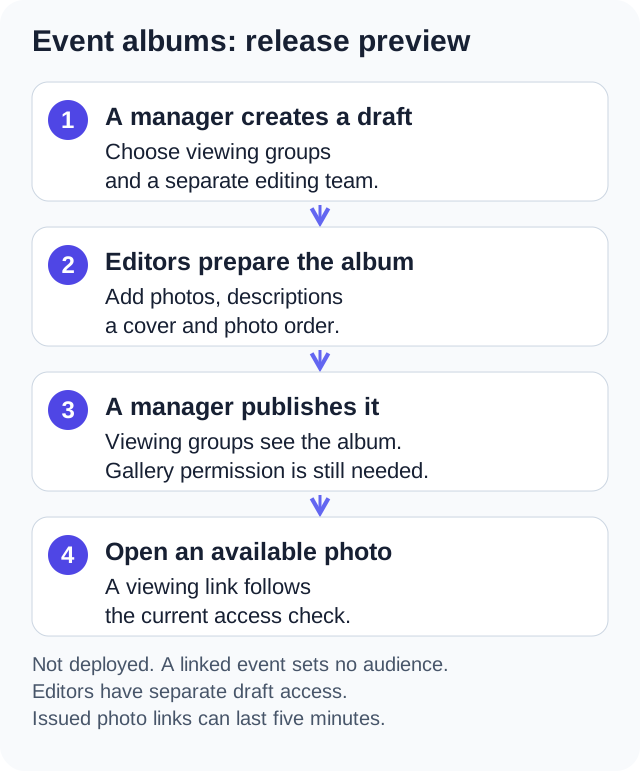
Event gallery keeps your organization's photos in albums. Your administrator chooses which groups can view each published album and separately chooses who can edit it.
Find an album#
- Open "Event gallery" from the home screen.
- Browse the album covers, or enter words in "Search albums". Use "Next page" and "Previous page" when there are more albums than one page can show.
- Open an album to see the album's description, photo grid, and captions.
- Open a photo for a larger view. Swipe between photos or use "Previous photo" and "Next photo". Pinch to zoom in.
You can also open a calendar event and press "View event gallery" to see albums linked to that event. You only see albums available to your account.
Use "Download photo" in the full photo view to open a fresh photo link in your browser for saving. The browser or device supplies its usual save controls.
A gallery can link to a calendar event, but access to the calendar and its photos is separate. You might have access to one without the other.
Why a gallery is missing#
The whole section is hidden when Gallery is off for your organization or you do not have View Event Gallery permission. An album can also be absent because it is a draft or is limited to groups you do not belong to. An administrator can check those settings for you.
A draft album is visible to the album's assigned editors and gallery managers only. Editors can also see an assigned published album even if they are outside its viewing groups.
If you are an editor#
Your administrator may assign you individually or through one of your groups. You still need View Event Gallery permission. Editing access applies to the assigned album; it does not make you an administrator.
Editors can:
- Change the album title and description.
- Upload up to 100 JPEG, PNG, WebP, or GIF photos at a time, up to 20 MB per photo.
- Add a "Caption" and an "Image description" for screen readers.
- Choose the album cover, change photo order, and remove photos.
Admins control the calendar link, publication, who can view or edit, and album deletion. If you are editing a published album, your saved changes appear to its viewers. Ask an admin to return it to draft when you need to prepare changes privately.
Uploads use your organization's storage allowance. If a photo is refused because storage is full, ask an admin to check usage. A batch can partly succeed; check the album before retrying photos.
Use the admin gallery guide for the editing steps and access rules.
Why can I view one album but not another linked to the same event?#
The Event gallery preview chooses viewers separately for each album. A linked calendar event does not supply the album's audience. After deployment, a member could therefore see the event and a published general album while being unable to open a committee-only album from the same event.
An editor assignment is separate again: an assigned editor can prepare that album in draft without becoming an admin, but still needs View Event Gallery. If access seems wrong, give your admin the album title and explain whether you expected to view or edit it. Adding an editor solely to solve a viewing problem would give that member additional powers to change photos and captions.
W3C's explanation of WCAG success criterion 1.1.1 asks for a text alternative for visual content, so people who cannot fully see a photo can still understand it. Section508.gov's guide to alternative text explains that a screen reader reads that text aloud when it reaches an image, which is what the "Image description" field is for. Those references describe accessibility practice in general; the album's editors decide what each description says.
FAQ#
Can anyone in the organization upload photos?#
Only gallery managers and people assigned as editors to that album can upload. Viewing an album does not grant editing access.
Why did my editing actions disappear?#
Your editor assignment, group membership, or View Event Gallery permission may have changed. Ask an admin to check your current access.
Why does a photo stop loading after a while?#
Photo links expire after five minutes. The album and photo viewer refresh their links while open. If a photo still does not load, use "Refresh photos" or reopen the album. The app checks your current access before issuing fresh links.
Published: . Last updated: .