Preserve election records and grant observer access
How do election records and observer access work?#
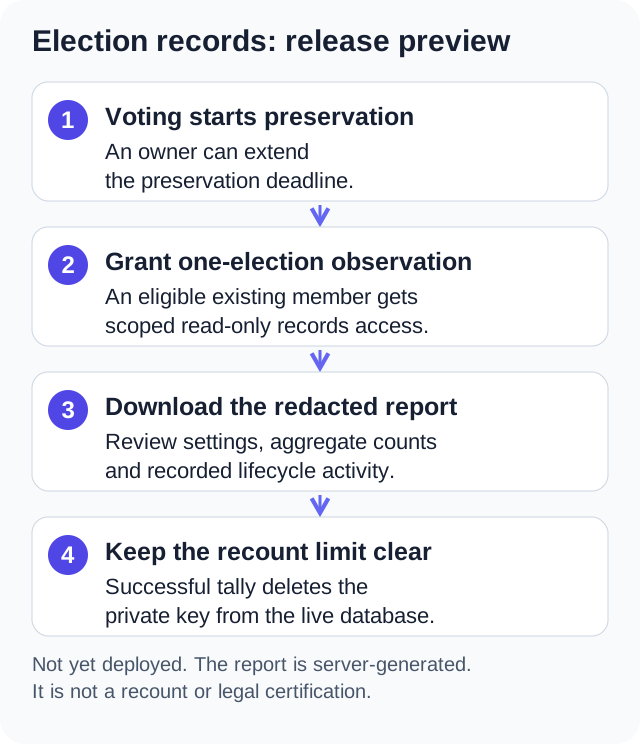
The election-records release preview lets owners and approved observers review an election's settings, aggregate counts, integrity status and recorded activity. Owners can extend preservation and grant access to individual observers. The preview is not yet deployed, and its application safeguards and server-generated report do not establish an independent recount or certification.
What is preserved#
Opening an election starts record protection automatically, whether voting opens immediately, manually, or on its schedule. Election-record protection continues while the election is open. After successful closure and tally, records remain protected for at least one calendar year. A longer deadline set by the owner continues to apply.
Protected election records include the election, options, eligibility, recorded ballots and chain, results, relevant lifecycle activity, and observer history. Deleting an election, a related user, or its organization is refused when that deletion would remove protected evidence. An owner or platform administrator cannot bypass this through the normal application controls.
An unused draft or scheduled election can still be deleted unless the owner has deliberately set a preservation deadline. Changing options in a preserved draft also removes old option records, so that change is refused. Preservation does not freeze every editable field of an unused draft.
Expiration of an election's preservation deadline does not delete anything automatically. It permits an otherwise authorized deletion. An open election stays protected until it is successfully closed, even if an owner-selected date has passed.
Open the records screen#
- In Admin > Elections, choose the election's records action.
- Review the election status, eligible and accepted ballot counts, results when available, integrity summary, and activity.
- Use Load more activity to see older report entries.
An approved observer can open Election records from that election's member detail screen. Owners have access automatically. An admin who is not an owner needs an observer grant to read this report.
Historical elections may display Historical voting dates were not recorded. Their preservation starts from the checkpoint when record protection was enabled. Those checkpoint dates are not verified historical opening or closing dates; completed historical elections receive at least one year of protection from that checkpoint.
Extend preservation#
Only a current, active owner can extend a deadline.
- Choose Extend preservation.
- Select a date later than both today and the current deadline.
- Enter a reason of 5-1,000 characters and save.
The application can extend protection but cannot shorten or clear it. An extension and its safe lifecycle activity become part of the election record. This is an application and database safeguard, not storage that a privileged database operator is unable to alter.
Add or remove an observer#
- As owner, choose Add observer.
- Select an existing active member of this organization who already has access to this election.
- Optionally enter a Candidate or observer label, then choose Grant access.
- To remove access, use the observer's revoke action and confirm Revoke access.
A grant applies to one election. The account must retain election module permission and existing audience eligibility; suspension, loss of those permissions, or revocation ends report access. Granting observer access does not add someone to a group, make them eligible to vote, promote them, or grant View Audit Logs. In particular, it does not override a family account's election restrictions. Revocation preserves the grant history.
Download the report#
Choose Download audit report. The JSON download gathers every page of report activity. The download checks activity totals and page counts and fails if those change during collection. Refresh and retry after such an error. Separate HTTP pages are not an atomic snapshot; other concurrent edits may not be detected.
The report includes election settings and options, preservation status, aggregate eligibility and ballot counts, recorded final totals, a server-computed chain integrity summary, and selected lifecycle actions. It omits voter identity and contact fields, IP addresses, individual turnout, vote events, per-ballot timestamps, nullifiers, receipt associations, ciphertext, private keys, and arbitrary audit metadata.
Election titles, descriptions, and option labels are free text and may contain candidate or other names. Review them before sharing.
Keep any exported copy under your organization's own access and retention policy. Revoking an observer stops future access; it cannot recall a file they already downloaded.
What this report cannot establish#
The report is application evidence, not an independent recount or certification. The existing tally process destroys the election private key after successful tally. Keeping encrypted ballot records does not make them decryptable afterward. The report does not contain ballot ciphertext or prove that each encrypted ballot represented the voter's intended choice.
The admin interface shows aggregate results rather than individual choices. The current voting service receives authenticated identity and plaintext choices before encrypting a ballot; absolute unlinkability against a hosting or service operator has not been established. Read How anonymous voting works.
For a binding election, review your applicable rules, notice and eligibility procedures, observation arrangements, record requirements, and privacy obligations before using the system. The Department of Labor's remote electronic voting guidance addresses preservation and meaningful observation, and the federal labor election regulation at 29 CFR 452.106 says the ballots and all other records pertaining to a covered secret ballot election must be preserved for one year (both checked October 12, 2026). Those sources describe federal rules and are not legal advice; this feature alone does not establish compliance or determine which laws apply to your organization.
Account or organization deletion is blocked#
A refusal means the requested deletion would erase protected election evidence. Suspending access and revoking sessions can still address an account that should no longer sign in. Resolve deletion requests through the applicable preservation and privacy process; do not delete a related organization to try to bypass the hold. See roles and permissions.
Published: . Last updated: .