How to amend your bylaws
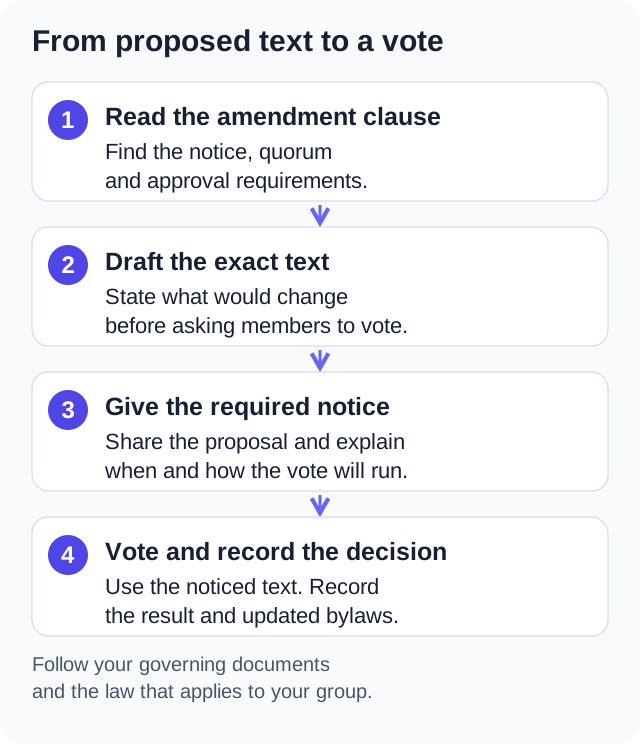
To amend bylaws, establish who may act, the required notice, quorum and approval threshold before voting on exact text. Keep the proposal, notice, ballot and final record together. The process depends on your governing documents and applicable law.
This is a way to prepare an amendment file for review, not a promise that a vote cannot be challenged. Your organization's applicable law, governing documents and adopted rules decide who acts and how. Resolve an unclear clause with counsel or a qualified parliamentarian before sending notice.
The amendment file starts with authority
Start with the amendment clause, not an online ballot. Keep its exact wording beside the version and date of the bylaws you are changing. Then fill in this worksheet from the provisions that actually apply.
| Question | What to put in the file |
|---|---|
| Who may propose the change? | The clause naming members, the board or a committee, including any submission deadline. |
| Who has power to adopt it? | The voting body and any required sequence or outside approval. |
| What notice is required? | The required period, recipient list, delivery method and scope/text requirements. |
| What counts as quorum? | The applicable definition and how participation in this particular procedure will be established. |
| What yes vote is needed? | The threshold, its denominator and the treatment of abstentions or invalid ballots under your rules. |
| Is the proposed voting method permitted? | The authority for a meeting, electronic participation or a vote outside a meeting. Permission for one does not settle all three. |
Do not infer who may amend from the label nonprofit, HOA or union. For example, New York N-PCL 602 addresses both member and board amendment powers, subject to restrictions in the certificate or member-adopted bylaws. That is a New York not-for-profit corporation example, not a national rule or authority for every association.
The Robert's Rules authors describe their procedures as defaults subject to applicable law and an organization's own rules. Check the authority your organization adopted and any rule governing this amendment; do not substitute a remembered two-thirds rule for the actual clause.
Keep the proposal, notice and ballot together
Give each proposal a label that stays the same in the committee file, notice, agenda and ballot. Keep the current wording, the proposed replacement and a short explanation together. A redline helps readers see what would be removed as well as added.
If proposals address separate subjects, decide how each will be presented and voted on under your rules. A person who supports a change to notice methods may oppose a change to officer terms. Do not hide that choice inside an unexplained package. A proposed full revision should be identified as such.
James Folk used nine questions for a constitution practice ballot, with one proposed change in each question. That arrangement describes a practice exercise, not an adopted amendment or a requirement to use separate questions for every proposal.
Before sending the notice
- Confirm which version of each proposal is being sent and which body will decide it.
- Use the required delivery method and timing. Do not assume that a portal link satisfies a requirement to deliver the text.
- Keep the actual notice and attachments, the intended recipient list and a record of the sending date.
- Resolve whether later floor changes would remain within the notice's allowed scope before taking those changes to a vote.
In One Group Central, documents and announcements can keep the material together. Audience settings, channel flags, contact details, quotas and delivery services affect distribution. An audit event or a sent count does not establish that each legally required recipient received the notice. Keep the recipient and delivery evidence your procedure requires separately.
Write out the denominator
Illustrative arithmetic: suppose a group has 400 members and 90 valid votes are cast. Two thirds of those 90 votes is 60. Two thirds of the entire 400-member body requires 267 yes votes. The same turnout cannot meet both thresholds. These are hypothetical counts, not the result of an actual amendment vote.
The arithmetic does not choose your rule. Record which denominator the clause uses, then establish quorum independently under the permitted procedure. The authors' official voting FAQs explain why a votes-cast threshold differs from a threshold based on members present or the entire membership. Ask about abstentions and invalid ballots before reporting a result.
Compare the ballot with the authorized proposal
Before opening voting, compare the displayed question and attached text with the version the members were told would be considered. Resolve any difference through the governing process; changing words in the app does not decide whether fresh notice is required.
If the method is electronic, check that it is authorized for this body and decision. Read the distinction between an electronic meeting and a ballot outside a meeting. An extended online window does not itself create quorum, cure a notice defect or make an unauthorized vote valid.
One Group Central encrypts ballots before storage and ordinarily shows admins aggregate totals. Its service receives identity and choices before encryption. Its receipt check establishes record presence, not ballot intent or an independent tally. It does not manage weighted interests, proxy reconciliation or a paper/electronic duplicate check. Compare those limits with your required procedure before using it for an amendment.
Leave the next secretary a usable record
Keep the proposal and exact text adopted, the authority used, the quorum determination, the relevant counts and threshold, and the effective date determined under your rules. Publish a clearly dated clean version once the decision is confirmed. Mark the earlier version as superseded rather than silently overwriting the historical record.
File the notice and delivery evidence, redline, ballot wording, result, minutes and any required approval together. If a count or procedure is disputed, preserve the file and seek advice instead of treating the software's result screen as a legal conclusion.
N-PCL 602 and the official Robert's Rules FAQs checked . This is general process information, not legal advice. The worksheet and counts are planning examples, not an adopted amendment or a legal opinion.
Check the paperwork and the member workflow separately
Try documents, announcements and a clearly labeled practice ballot in One Group Central after confirming the procedure your organization must follow.
Start your free trial